
Registration Confirmation
Registration Confirmation
Registration Confirmation
Role
Role
Lead Designer and Researcher
Lead Designer and Researcher
Collaborator (S)
Collaborator
Emily Johnson
Emily Johnson
SKILLS
SKILLS
UX/UI Design
Prototyping
User Research
UX/UI Design
Prototyping
User Research
Project Overview
Project Overview
Creating a clearer and more reassuring post-registration experience
Creating a clearer and more reassuring post-registration experience
The Registration Confirmation redesign aimed to address user uncertainty after creating an account on Uline’s website. After registering, the user’s account is not created right away. On the backend side, it takes a couple minutes before the account is actually created and activated. Because account activation takes a few moments to process, users were left unsure whether their registration was successful, leading to confusion and frustration.
The Registration Confirmation redesign aimed to address user uncertainty after creating an account on Uline’s website. After registering, the user’s account is not created right away. On the backend side, it takes a couple minutes before the account is actually created and activated. Because account activation takes a few moments to process, users were left unsure whether their registration was successful, leading to confusion and frustration.
The previous design lacked visual clarity, feedback, and guidance for next steps. Ambiguous wording, plain layout, and unclear link destinations reduced user confidence in the registration process. The goal of this project was to create a confirmation page that clearly communicates success, reassures users during activation, and directs them smoothly to their next action.
The previous design lacked visual clarity, feedback, and guidance for next steps. Ambiguous wording, plain layout, and unclear link destinations reduced user confidence in the registration process. The goal of this project was to create a confirmation page that clearly communicates success, reassures users during activation, and directs them smoothly to their next action.
THE SOLUTION
THE SOLUTION
Helping users feel confident their registration succeeded and what happens next
Helping users feel confident their registration succeeded and what happens next
By improving feedback, structure, and messaging, the new design helps users feel secure and supported immediately after registration.
By improving feedback, structure, and messaging, the new design helps users feel secure and supported immediately after registration.
RESEARCH
RESEARCH
Key Research Goals
Key Research Goals
Understand how people discover new places and experiences
Identify pain points in planning and following through on outings
Explore social dynamics around coordinating plans with others
Determine what features encourage users to take action, not just browse
Understand how people discover new places and experiences
Identify pain points in planning and following through on outings
Explore social dynamics around coordinating plans with others
Determine what features encourage users to take action, not just browse
Competitive Analysis and Competitor Matrix
Competitive Analysis and Competitor Matrix
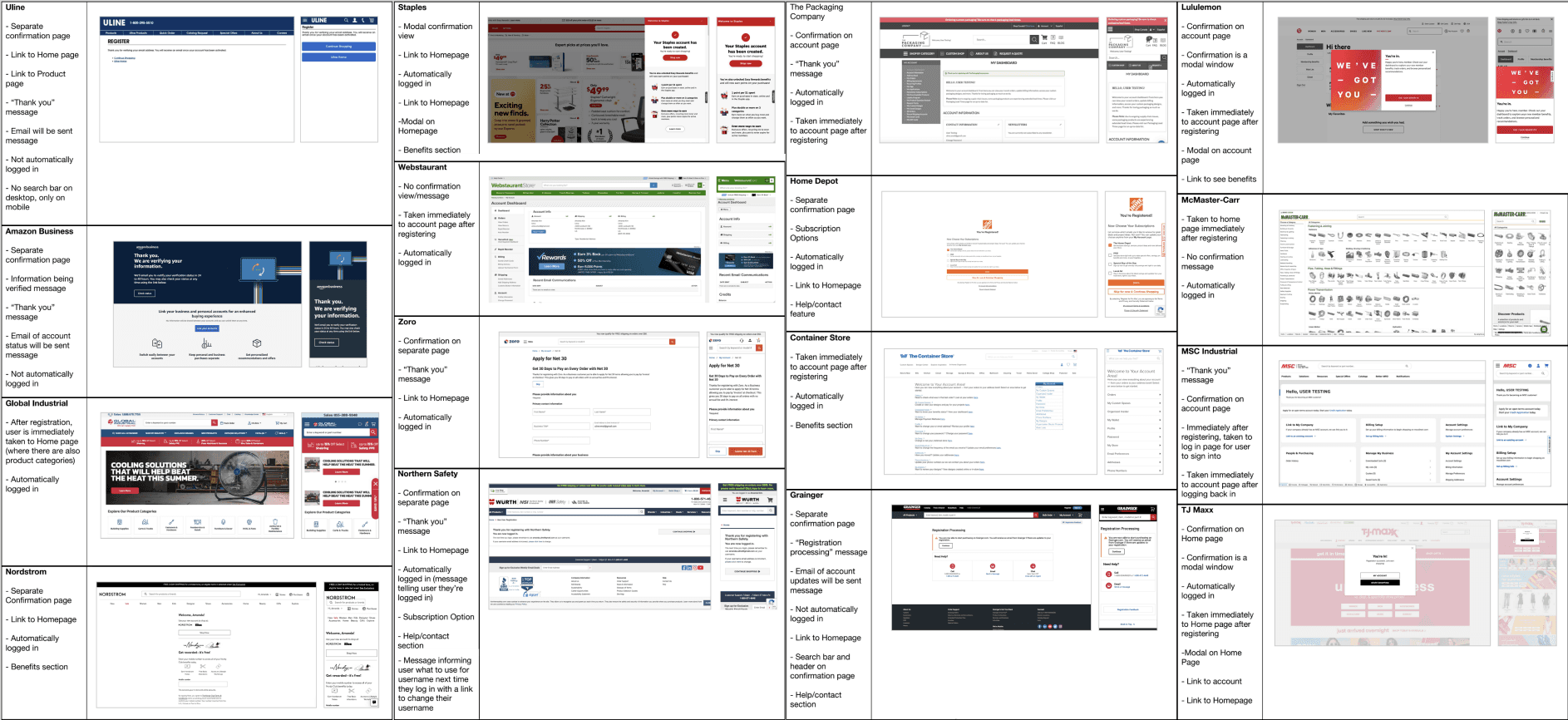
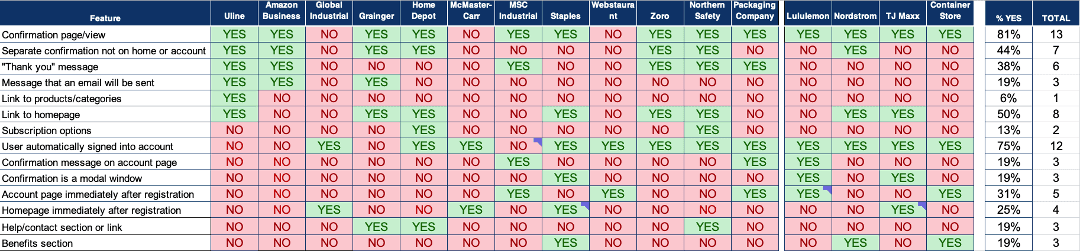
Created a competitor matrix to identify features and trends in eCommerce registration flows
Created a competitor matrix to identify features and trends in eCommerce registration flows
Key FIndings
Key FIndings
Most competitors have a confirmation page/view and automatically sign their users in after they register for an account.
After registering, competitors took users to one of the following:
Home page (25%)
Account page (31%)
Separate confirmation page (44%)
Competitors use different confirmation page variations that include a combination of the following features:
“Thank you” message
Message than an email will be sent
Links to products/categories
Link to Homepage
Subscription options
Help/contact section
Benefits information
Most competitors have a confirmation page/view and automatically sign their users in after they register for an account.
After registering, competitors took users to one of the following:
Home page (25%)
Account page (31%)
Separate confirmation page (44%)
Competitors use different confirmation page variations that include a combination of the following features:
“Thank you” message
Message than an email will be sent
Links to products/categories
Link to Homepage
Subscription options
Help/contact section
Benefits information
User Interviews
User Interviews
Research focused on understanding user expectations of registration process
Research focused on understanding user expectations of registration process

Moderated user interviews via UserTesting.com with desktop audio functiontality.
Moderated user interviews via UserTesting.com with desktop audio functiontality.
Key Research Goals
Key Research Goals
Understand customer expectations for registration confirmation
Understand what information/interactions are helpful to include from a customer perspective
Understand customer expectations for registration confirmation
Understand what information/interactions are helpful to include from a customer perspective
DELIVERABLES
DELIVERABLES
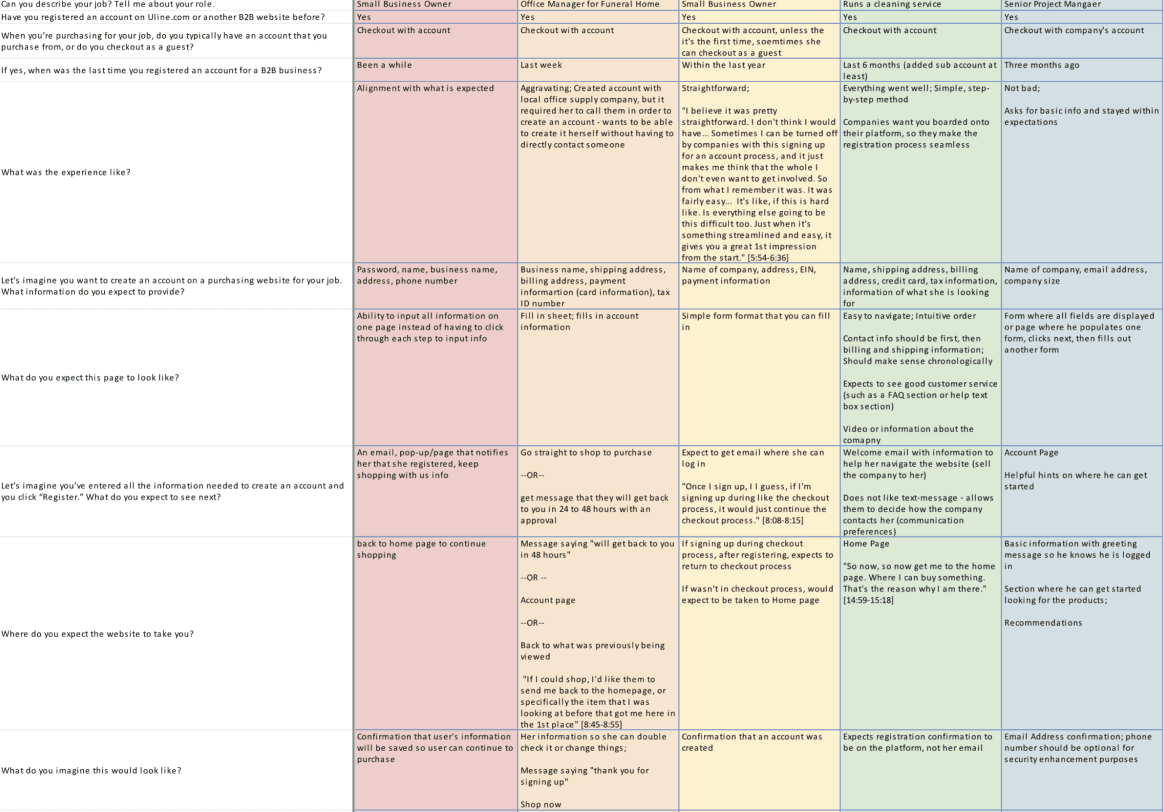
Based on user interviews, I identified key trends and patterns using rainbow charts
Based on user interviews, I identified key trends and patterns using rainbow charts
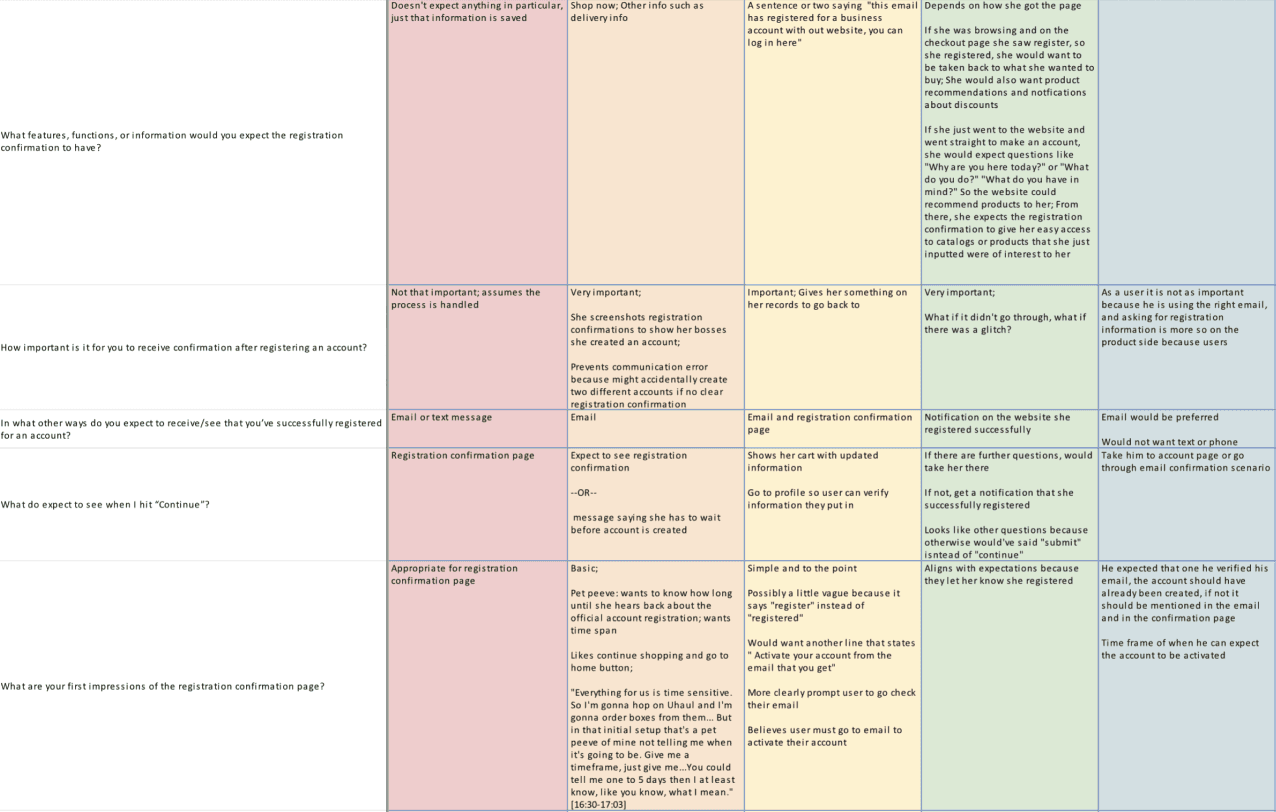
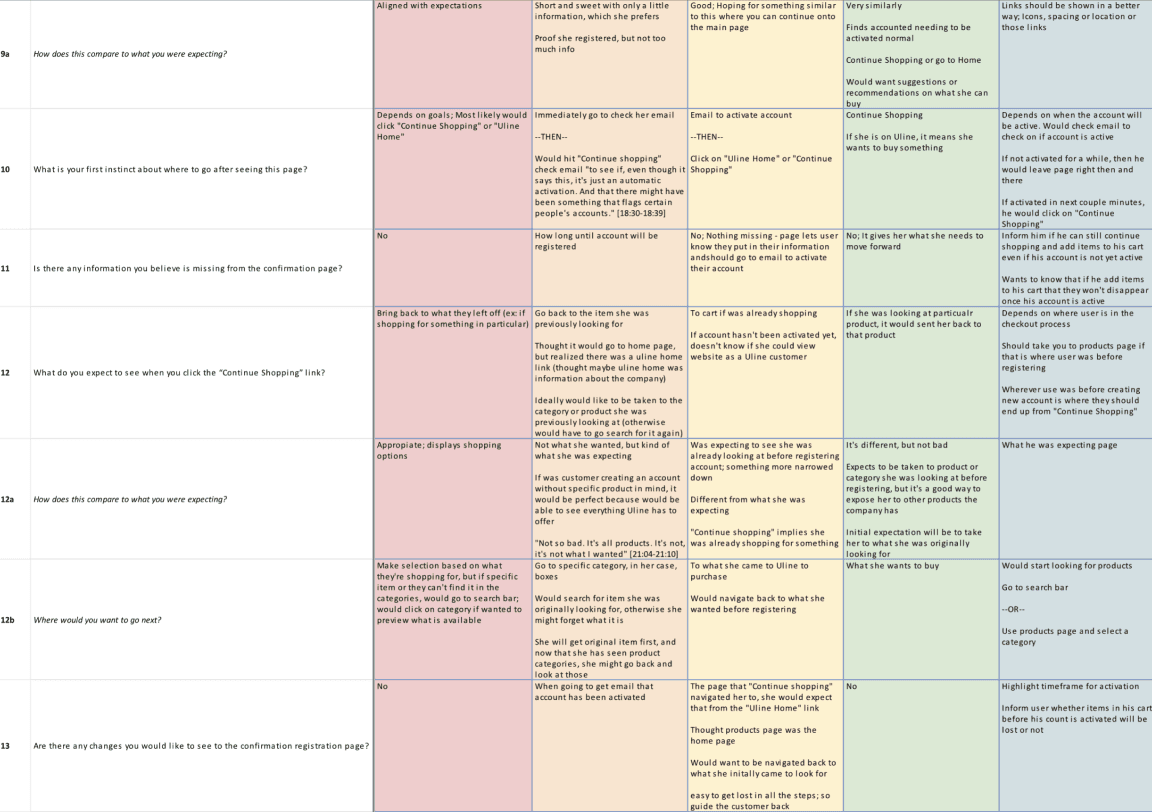
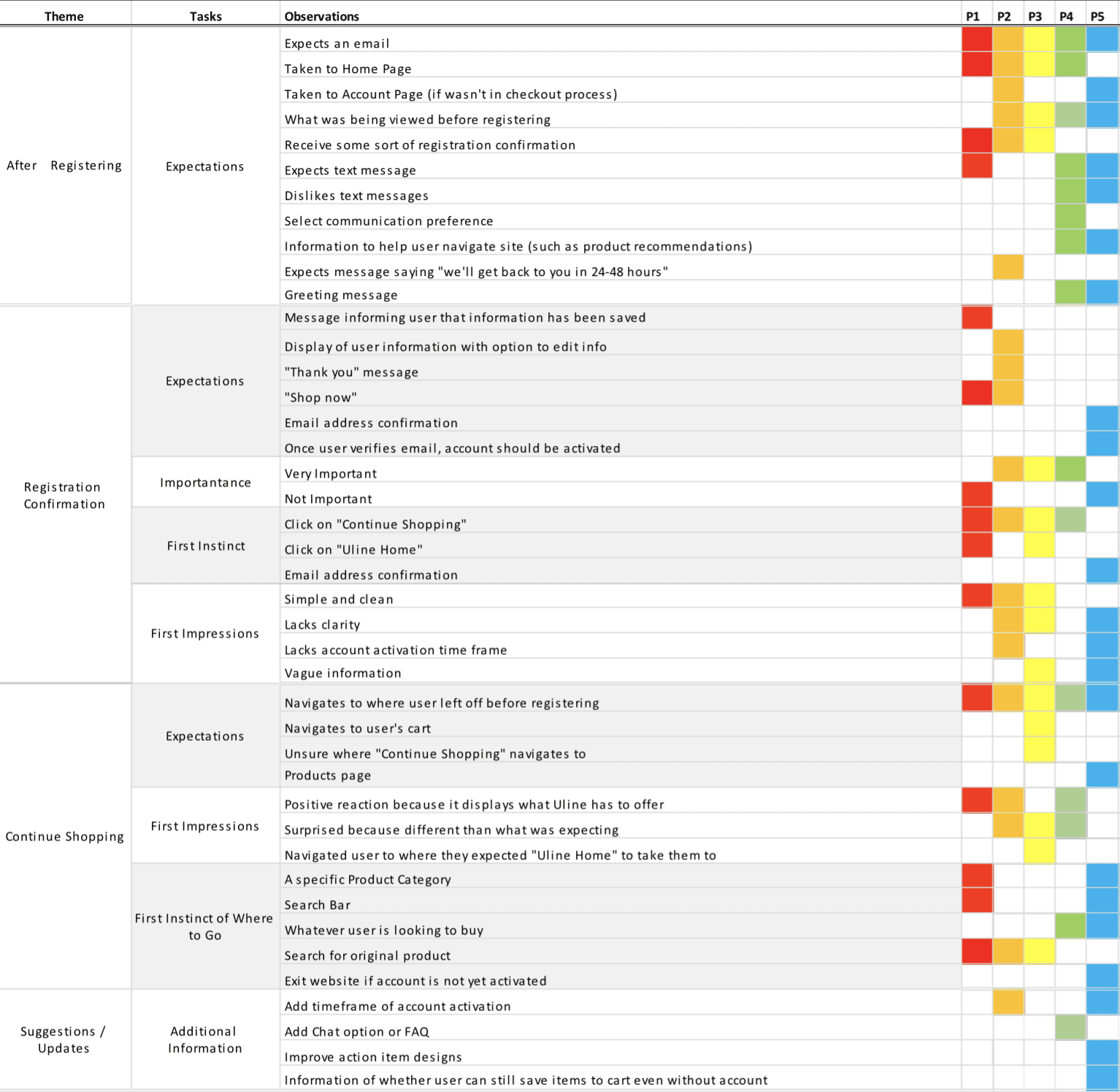
I used rainbow charts to organize and synthesize insights from user interviews. This method helped visualize recurring feedback, identify patterns in user uncertainty, and highlight areas where the registration process lacked clarity.
I used rainbow charts to organize and synthesize insights from user interviews. This method helped visualize recurring feedback, identify patterns in user uncertainty, and highlight areas where the registration process lacked clarity.
Analysis of User Interviews
Analysis of User Interviews
Using rainbow charts to visualize trends in user insights
Using rainbow charts to visualize trends in user insights
Key FIndings
Key FIndings
“Continue Shopping” link doesn’t take users where they expect
Most users expect it to take them to what they were viewing before registering
Most users place a lot of importance on emails when it comes to registering for an account
First instinct of most users after registering an account is to check email
Most participants found registration confirmation page to be vague/lacking in information
No time frame of when account will be activated
Continue Shopping” implies continuing where user left off before registering
“Register” instead of “Registered” makes some users question if they registered or not
“Continue Shopping” link doesn’t take users where they expect
Most users expect it to take them to what they were viewing before registering
Most users place a lot of importance on emails when it comes to registering for an account
First instinct of most users after registering an account is to check email
Most participants found registration confirmation page to be vague/lacking in information
No time frame of when account will be activated
Continue Shopping” implies continuing where user left off before registering
“Register” instead of “Registered” makes some users question if they registered or not
DESIGN & IDEATION
DESIGN & IDEATION
Led an ideation session with UX designers and the registration team
Led an ideation session with UX designers and the registration team
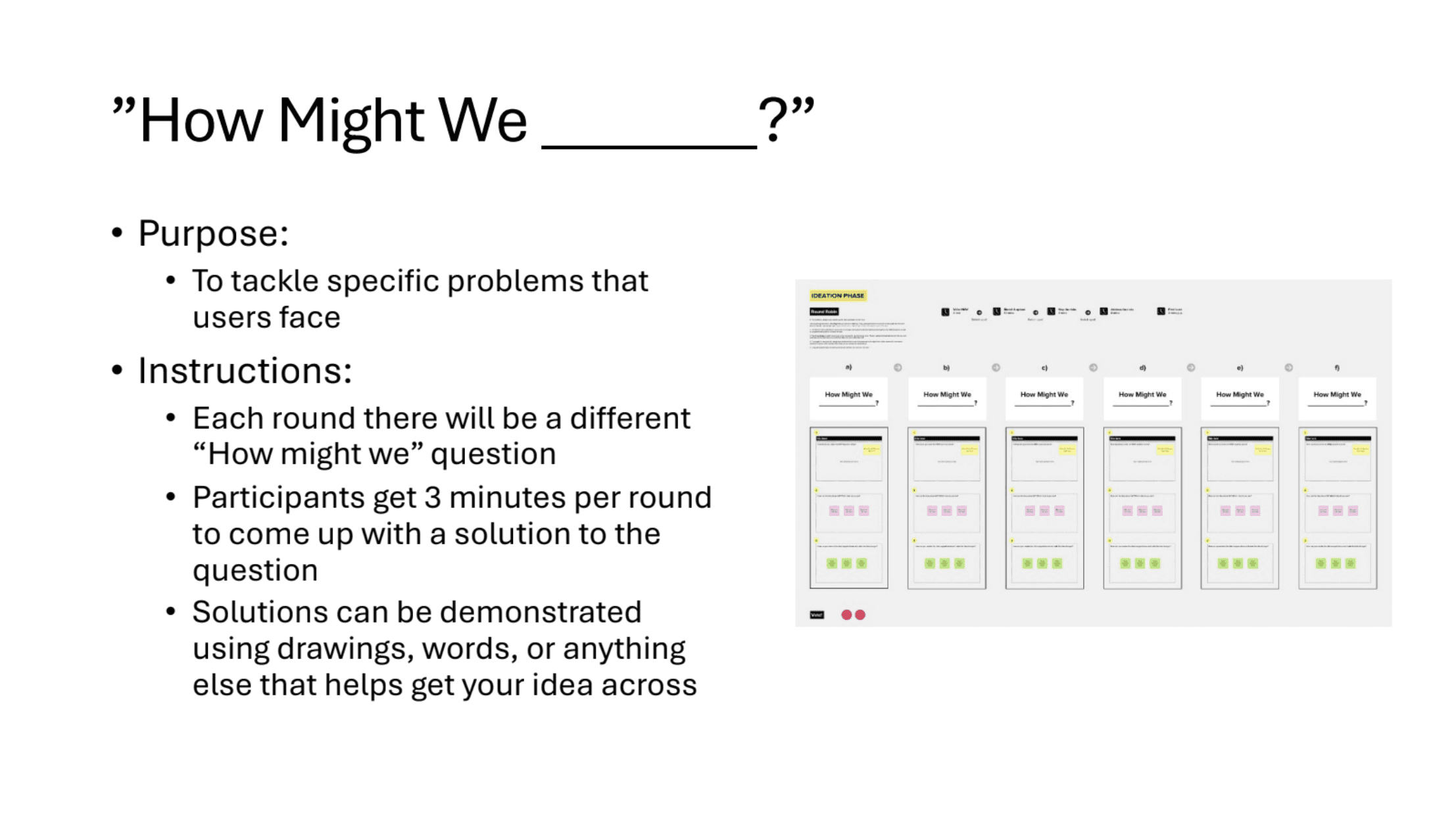
Conducted a “What We Know” and ideation session to explore solutions to user pain points within the registration confirmation process. The “What We Know” exercise encouraged participants to think critically about user challenges and generate actionable ideas for improvement.
Conducted a “What We Know” and ideation session to explore solutions to user pain points within the registration confirmation process. The “What We Know” exercise encouraged participants to think critically about user challenges and generate actionable ideas for improvement.
"How Might we _?" Ideation Session
"How Might we _?" Ideation Session
Ideation Brainstorming
Ideation Brainstorming
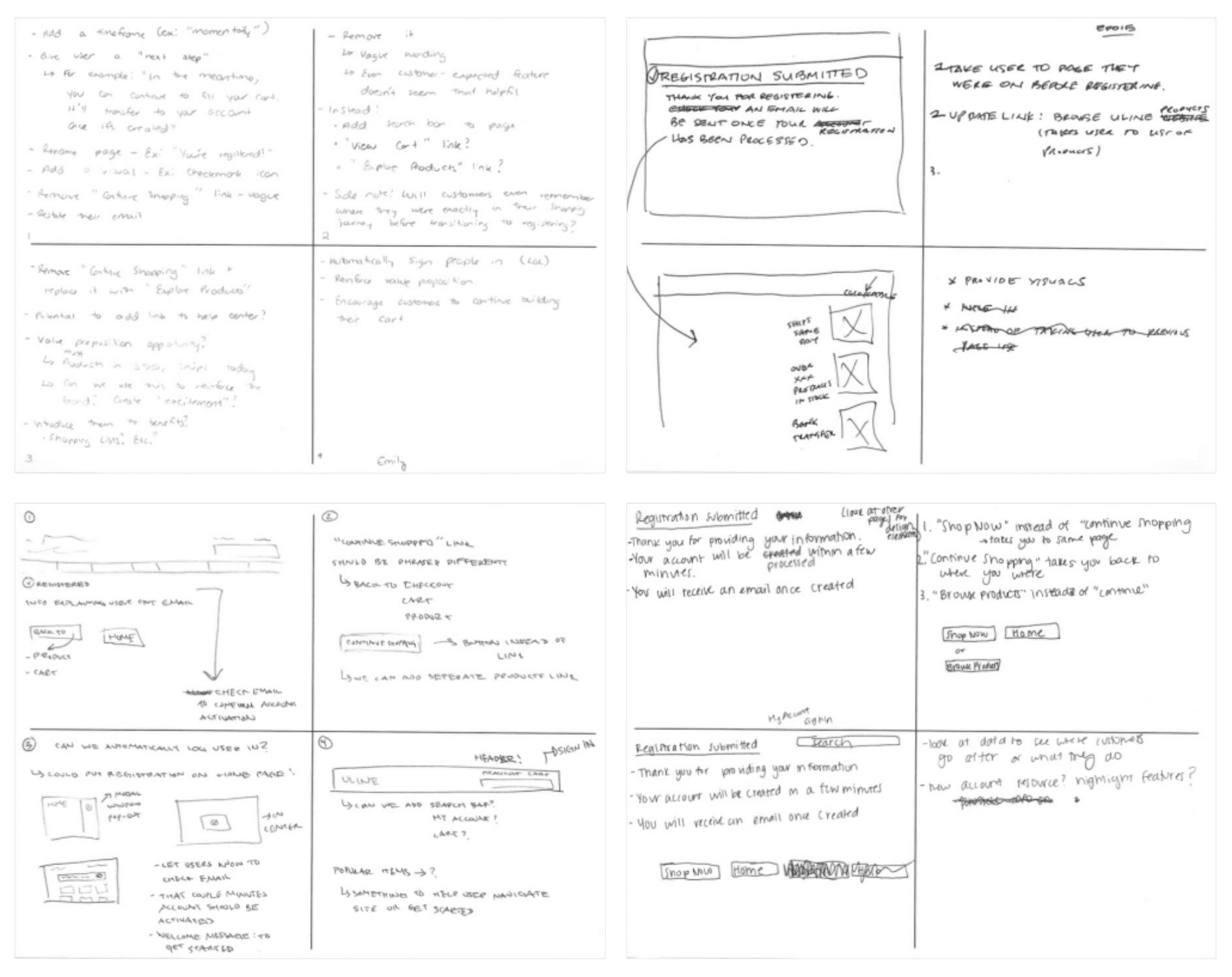
Throughout the ideation session, stakeholders explored potential features to improve the registration confirmation page, new phrasing to clearly communicate account activation timing, and alternative buttons or navigation paths to guide users forward.
Throughout the ideation session, stakeholders explored potential features to improve the registration confirmation page, new phrasing to clearly communicate account activation timing, and alternative buttons or navigation paths to guide users forward.
Iterations
Iterations
Created multiple design concepts based on ideas generated during the ideation session
Created multiple design concepts based on ideas generated during the ideation session
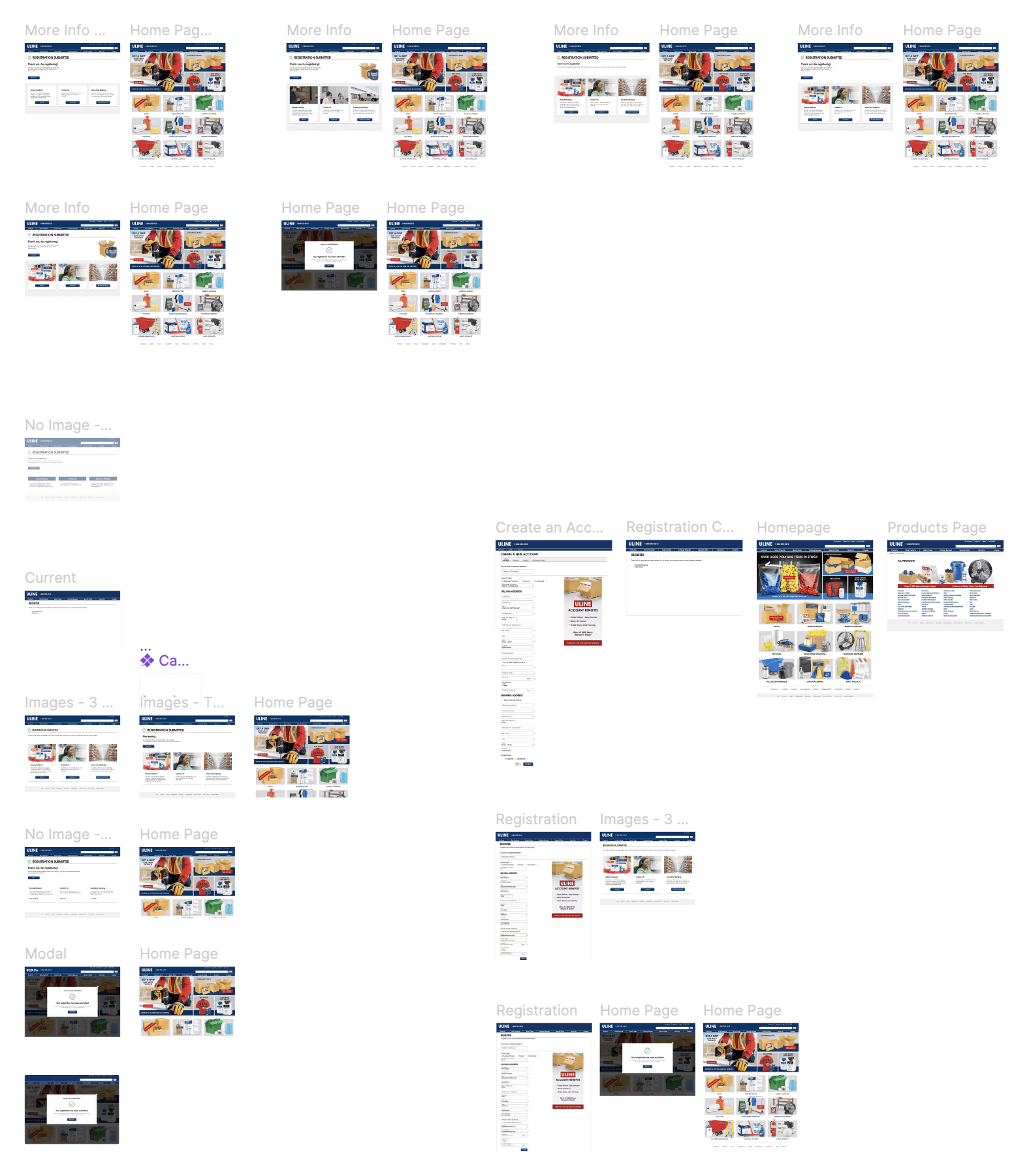
From the concepts, I held design reviews with stakeholders to determine which directions to move forward with for user testing
From the concepts, I held design reviews with stakeholders to determine which directions to move forward with for user testing
User TESTING & THE IMPACT
User TESTING & THE IMPACT
Finalized two design concepts for user testing after multiple reviews and iterations
Finalized two design concepts for user testing after multiple reviews and iterations
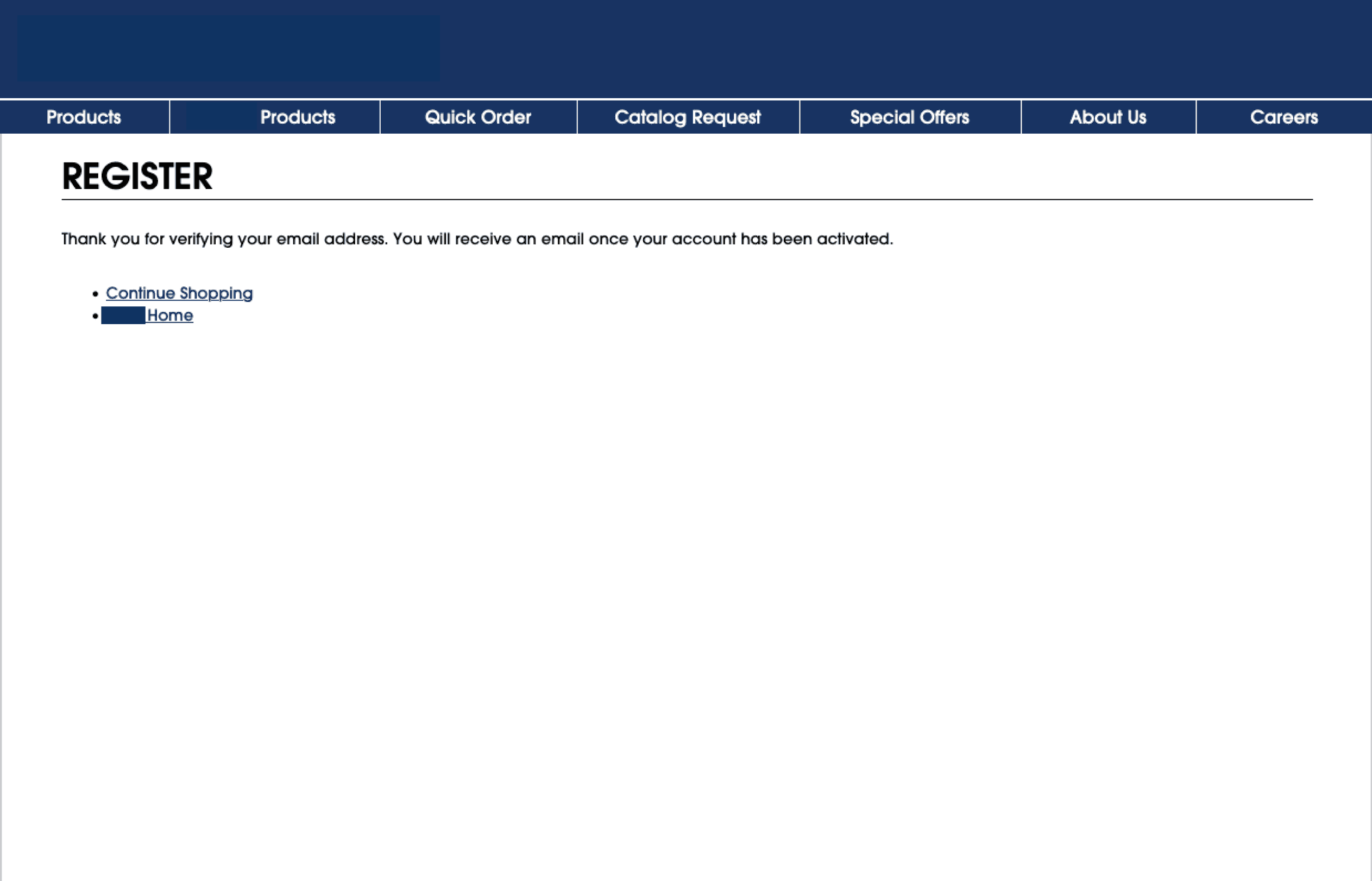
Previous Design
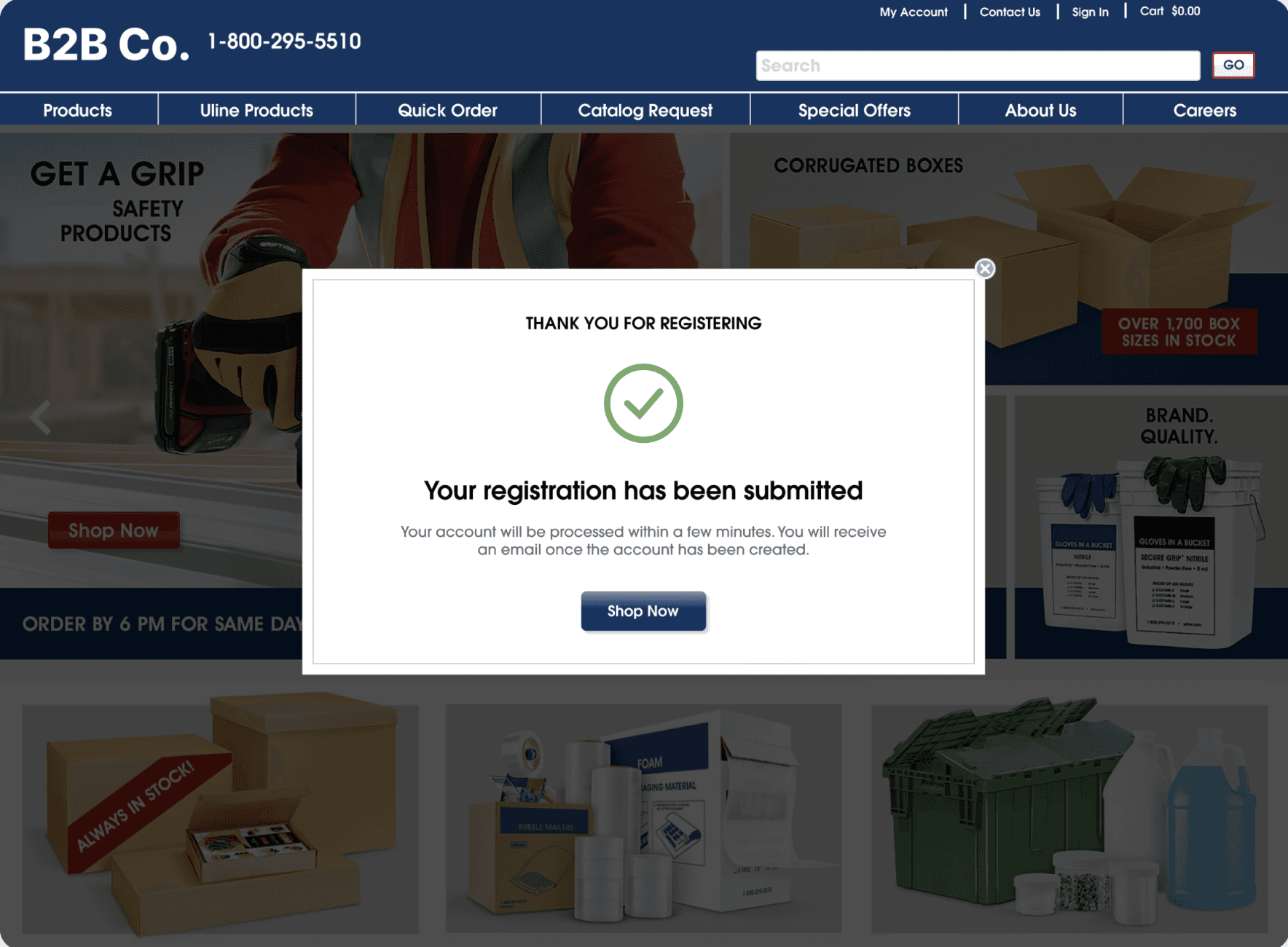
Final Designs
Final Designs
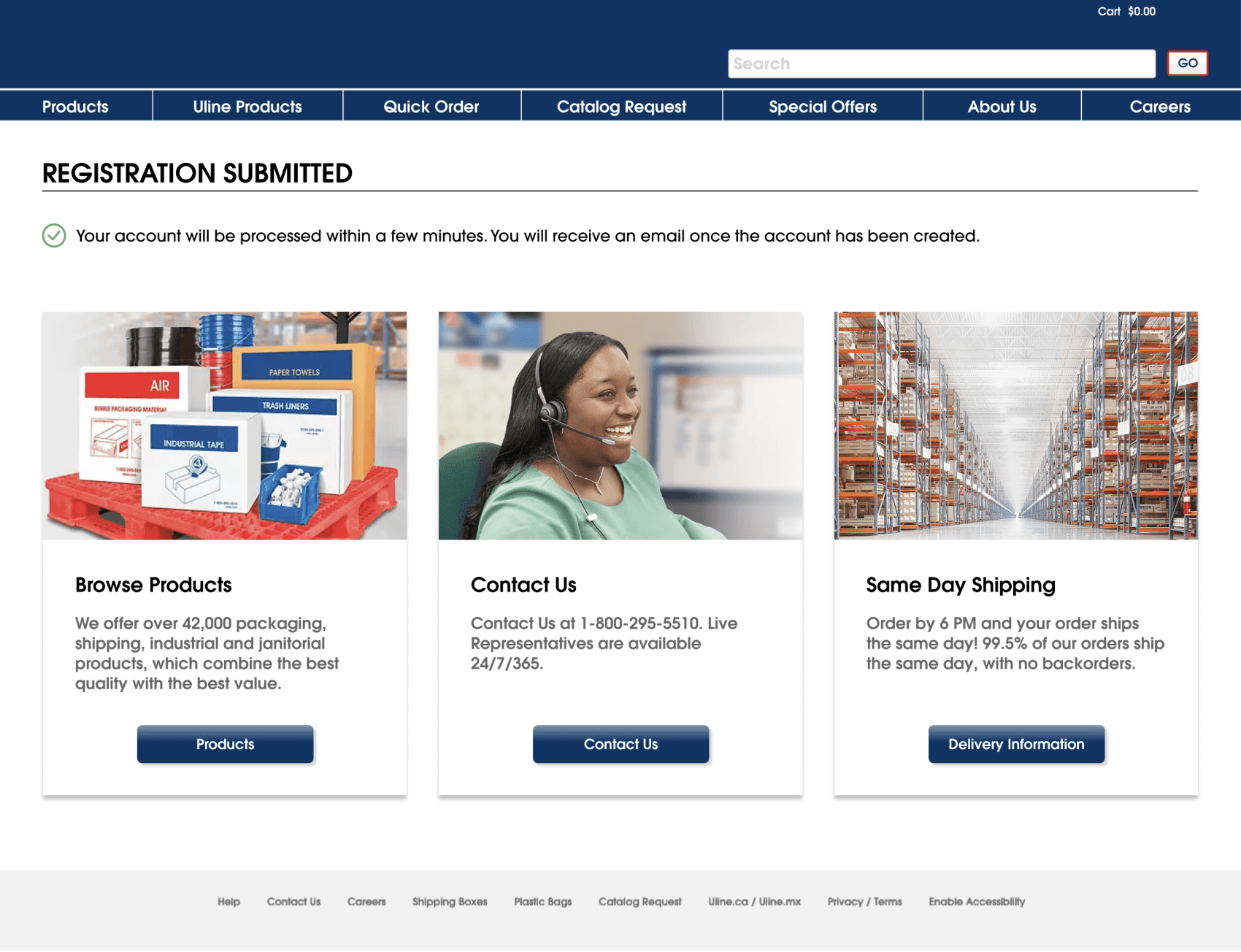

First, I created a usability test plan which lists out the goals, methodology, participant profile, format, script, and questions that would be used. Two separate tests were run in order to examine the two registration confirmation concepts, allowing me to determine which registration confirmation page was the best fit.
First, I created a usability test plan which lists out the goals, methodology, participant profile, format, script, and questions that would be used. Two separate tests were run in order to examine the two registration confirmation concepts, allowing me to determine which registration confirmation page was the best fit.
Key Findings:
Version 1 (Confirmation Page):
High confidence in successful registration - users felt reassured by the confirmation modal and email validation
Primary next step - the majority of users instinctively wanted to browse products after registering
Lack of interest in delivery information and contact buttons - users didn’t see much need for the delivery information or contact buttons unless specific issues arose
Clear understanding of sign-in process - users understood that they had to wait for an email before signing in and that account creation would take some time
Version 2 (Confirmation Modal):
High confidence in successful registration - users felt reassured by the confirmation modal and email validation
Positive reception of modal design - users liked that the confirmation appeared on the home page
Instinctive action - most users’ first reaction was to click "Shop Now" to continue browsing
Clear understanding of sign-in process - users knew they had to wait for an email before signing in and understood the account activation delay
Key Findings:
Version 1 (Confirmation Page):
High confidence in successful registration - users felt reassured by the confirmation modal and email validation
Primary next step - the majority of users instinctively wanted to browse products after registering
Lack of interest in delivery information and contact buttons - users didn’t see much need for the delivery information or contact buttons unless specific issues arose
Clear understanding of sign-in process - users understood that they had to wait for an email before signing in and that account creation would take some time
Version 2 (Confirmation Modal):
High confidence in successful registration - users felt reassured by the confirmation modal and email validation
Positive reception of modal design - users liked that the confirmation appeared on the home page
Instinctive action - most users’ first reaction was to click "Shop Now" to continue browsing
Clear understanding of sign-in process - users knew they had to wait for an email before signing in and understood the account activation delay
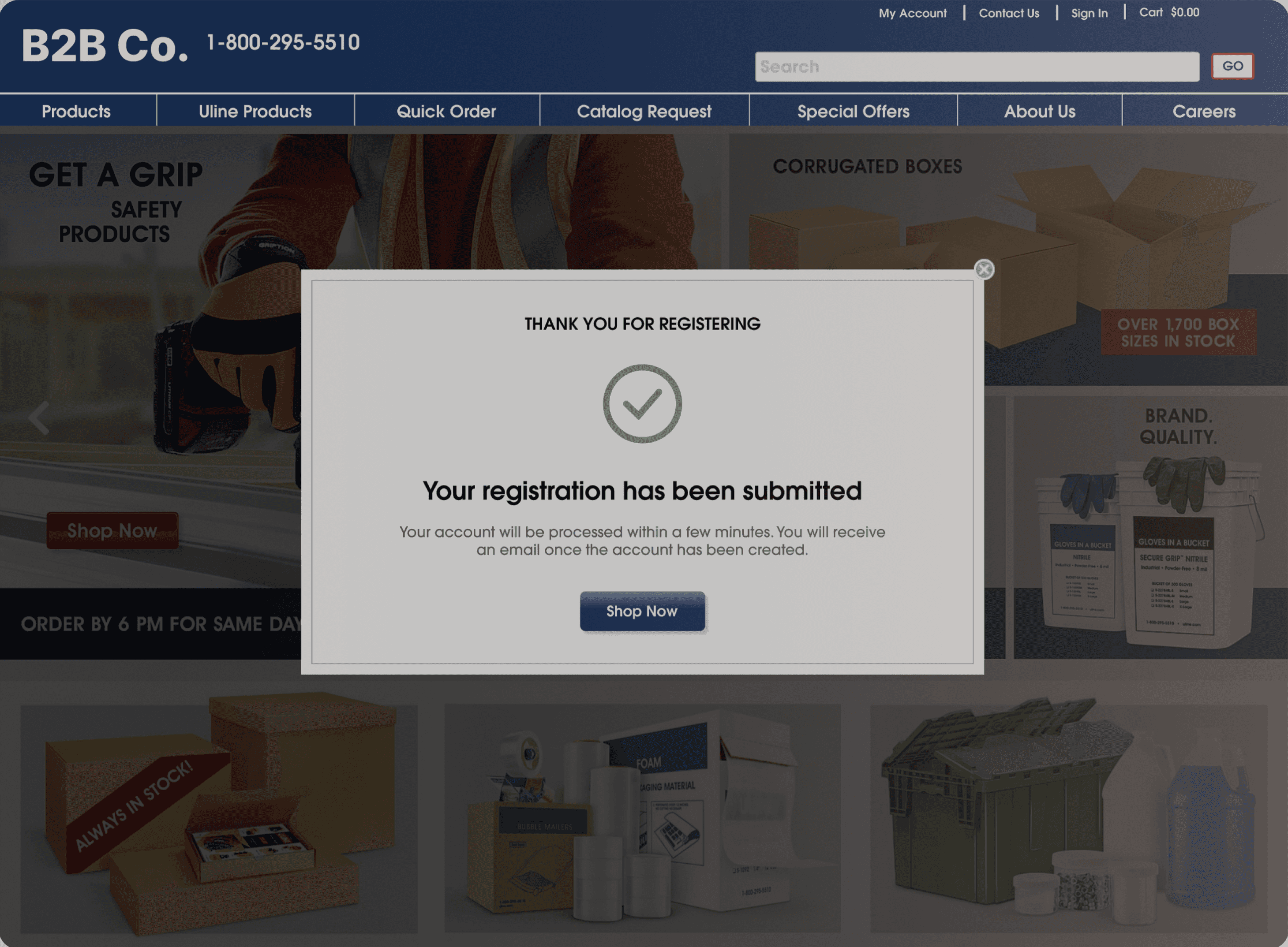
Usability testing showed that the modal design created a smoother experience by keeping users on the homepage and allowing them to start shopping immediately. It clearly communicated that account activation would take time and that users would receive a confirmation email, reducing uncertainty. The transparent overlay reinforced context and helped users feel confident their registration was successful.
Usability testing showed that the modal design created a smoother experience by keeping users on the homepage and allowing them to start shopping immediately. It clearly communicated that account activation would take time and that users would receive a confirmation email, reducing uncertainty. The transparent overlay reinforced context and helped users feel confident their registration was successful.
REFLECTION
REFLECTION
TAKEAWAYS
TAKEAWAYS
TAKEAWAYS
Designing With Constraints: Because there is already a set style in place for the company, it has allowed me to focus more on solving the problem the customer or user is facing.
Holistic Process: Went through whole process of both user research and UX/UI design, which taught me about each step that much be taken at a B2B company when doing both research and design
Skills: Taught me how use UserTesting.com, Quantum Metric, and I learned valuable collaboration skills
Designing With Constraints: Because there is already a set style in place for the company, it has allowed me to focus more on solving the problem the customer or user is facing.
Holistic Process: Went through whole process of both user research and UX/UI design, which taught me about each step that much be taken at a B2B company when doing both research and design
Skills: Taught me how use UserTesting.com, Quantum Metric, and I learned valuable collaboration skills
Designing With Constraints: Because there is already a set style in place for the company, it has allowed me to focus more on solving the problem the customer or user is facing.
Holistic Process: Went through whole process of both user research and UX/UI design, which taught me about each step that much be taken at a B2B company when doing both research and design
Skills: Taught me how use UserTesting.com, Quantum Metric, and I learned valuable collaboration skills